My Store
M15 Wireless Retro Game Console - Nostalgic Gaming Stick with 20,000 Built-in Games, HDMI Output, and 2.4G Wireless Controllers
M15 Wireless Retro Game Console - Nostalgic Gaming Stick with 20,000 Built-in Games, HDMI Output, and 2.4G Wireless Controllers
Regular price
$69.97 USD
Regular price
$0.00 USD
Sale price
$69.97 USD
Unit price
per
Couldn't load pickup availability
M15 Wireless Retro Game Console - Retro Play Game Stick, Nostalgia Stick Game, Emulators, HDMI Output, Plug and Play Video Game Stick Built in 20000 Games with 2.4G Wireless Controllers
Key Features:
- Built-in Retro Games: The wireless classic TV game console system comes with over 20,000 built-in games and pre-installed emulators.
- High-definition HDMI Output: Enjoy retro video games on the big TV screen by connecting to your TV using a mini HDMI cable. The video game stick supports high definition HDMI output. Ensure your screen has a HDMI input port.
- Fantastic Gift: The nostalgia stick game console provides hours of fun for kids and evokes fond memories of childhood for adults.
- Easy Operation: Connect the retro game stick to the power supply, then plug it into the TV. Change the TV signal source to the HD channel. Follow these steps: 1. Connect the HD output of the TV. 2. Insert the built-in TF game card. 3. Use the charging adapter to connect to the TV. 4. The game stick will automatically turn on when the charging adapter is connected to the TV.
- Wireless Connectivity: 2 x 2.4GHz wireless game controllers come with the retro video game console to achieve wireless connectivity between game controllers and joysticks. (The package does not include AA batteries)
What's Included:
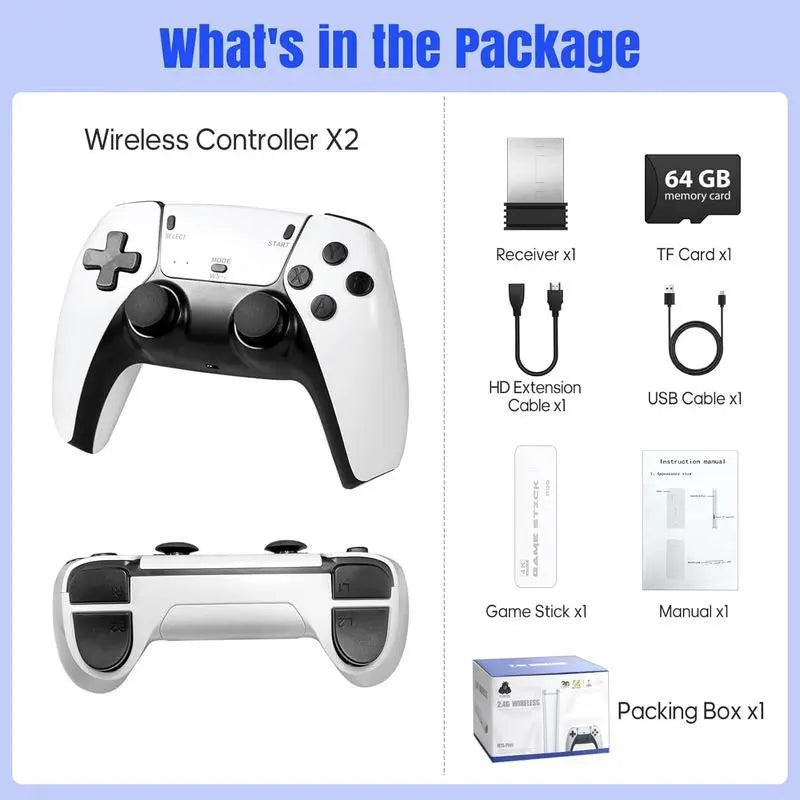
- M15 Wireless Retro Game Console
- 2 x 2.4GHz wireless game controllers
- 64GB memory card
- Mini HDMI cable
- Charging adapter
Compatibility:
- TV
- TV set-top box
- PC
- Laptop
- Projector
Usage:
- Connect the HD output of the TV.
- Insert the built-in TF game card.
- Use the charging adapter to connect to the TV.
- The game stick will automatically turn on when the charging adapter is connected to the TV.
Note:
- The package does not include AA batteries.
- Important notes for product installation and use: Please do not use the TV’s power port for power supply. This can lead to insufficient power, preventing proper operation. Instead, use a charger with a power rating of 1.5A or higher. If you encounter any issues, do not worry. Contact customer service immediately, and we will provide top-notch after-sales support.